The Problem With AI Filters for Undertone Detection on Brown Skin
AI filters and beauty apps aren't built to analyze undertones accurately. Here's why they fail especially hard on brown skin.
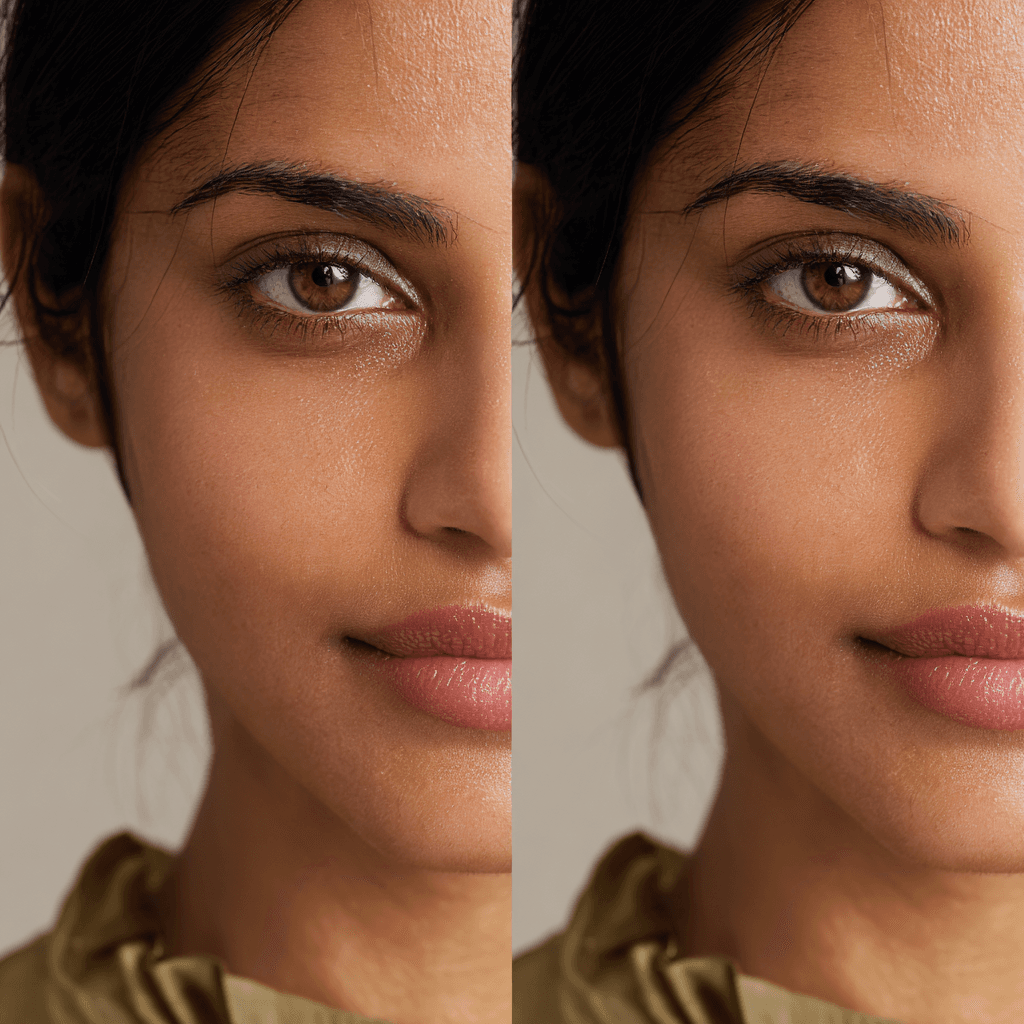
AI beauty filters distort the very color data needed to identify undertone accurately. Brightness adjustments, saturation shifts, and color grading all change how skin tone reads in a photo. For brown skin, these effects are amplified because melanin interacts with brightness and saturation changes differently than lighter skin. The result is confident-sounding analysis of inaccurate data.
Most apps that advertise undertone detection apply some form of processing before or during analysis. Even "no filter" modes often leave camera auto-adjustments and compression in place. The fix isn't finding a better filter. It's using methods that don't rely on photos at all. Our guide to understanding your undertone covers the jewelry test and white paper test, both of which bypass the photo problem entirely.
The Filter That Changed Your Skin Tone
You open a beauty app to figure out your undertone. It analyzes your photo and gives you an answer. Warm. Cool. Neutral.
You trust it because it's AI. It sounds scientific.
But if you look closely at the photo the app analyzed, your skin doesn't quite look like your skin. The brightness is different. The saturation is off. The color has shifted.
That's the core problem. AI filters change the very data they're supposed to be analyzing.
What AI Filters Actually Do
Beauty apps and AI filters are designed to make photos look good, not to preserve accurate color information.
They Adjust Brightness Automatically
Most apps boost brightness to make images more visually appealing. Brighter photos get more engagement, so algorithms are trained to lighten.
For undertone detection, this is a problem. Brightness changes how undertones appear. A warm undertone that's been artificially brightened can start to look neutral or even slightly cool.
They Enhance Contrast
Filters often increase contrast to make features pop. Clearer skin, sharper details, more defined edges.
But contrast adjustments affect color relationships. The difference between your skin tone and undertone gets exaggerated or minimized depending on how the contrast is applied.
They Shift Saturation
Many filters boost saturation to make colors more vibrant. This makes photos look more Instagram-worthy.
It also distorts undertones. A subtle warm undertone becomes more obviously warm. A neutral undertone might shift warmer or cooler depending on how the saturation algorithm works.
They Apply Color Grading
Some filters add subtle color casts. Warmth for a golden-hour glow. Coolness for a crisp, clean aesthetic.
These casts directly change your skin's color, making accurate undertone detection impossible.
Why This Hits Brown Skin Harder
These problems affect all skin tones, but they're worse for brown skin.
Melanin Absorbs Light Differently
Brown skin has more melanin, which absorbs and reflects light in ways that lighter skin doesn't. Small changes in brightness or saturation have bigger effects on how undertones appear.
A filter that slightly brightens lighter skin might dramatically shift how brown skin's undertones read.
Undertones Are More Subtle
In brown skin, undertones are often more subtle and harder to detect than in lighter skin where contrast makes them more obvious.
AI filters that enhance or reduce subtlety can completely mask or falsely create undertone signals.
Training Data Bias
Most AI beauty filters were trained primarily on lighter skin tones. They're optimized to make those skin tones look good, which often means they handle brown skin poorly.
The adjustments that "enhance" lighter skin often distort brown skin in unpredictable ways.
What Happens When You Analyze Filtered Images
If an app or tool is analyzing an image that's already been filtered (even subtly), it's not reading your actual skin tone. It's reading the filtered version.
That filtered version might show you as warmer than you are. Or cooler. Or more neutral. The AI has no way to know the original data was altered.
Even tools that claim not to use filters often apply automatic adjustments during upload or processing. Your phone's camera applies adjustments. Image compression applies changes. The app's processing applies more changes.
By the time the analysis happens, the color data is meaningless for undertone detection.
The Lighting Problem Gets Worse
We already know lighting affects undertone detection in photos. AI filters make this worse by trying to "correct" lighting.
If you took a photo in warm indoor lighting, a filter might cool it down to make it look more neutral. Now your warm undertone looks cooler.
If you took a photo in harsh fluorescent light, a filter might warm it up. Now your cool undertone looks warmer.
The AI is fighting the lighting issue by creating new color inaccuracies.
Marketing vs Reality
Many apps advertise "AI-powered undertone detection" or "advanced color analysis." It sounds impressive and scientific.
But if the tool is applying filters or adjustments before analyzing, the AI is just confidently analyzing bad data.
Garbage in, garbage out. No amount of sophisticated AI can extract accurate undertone information from distorted color data.
What About "No Filter" Modes
Some apps have options to turn off beautification or filters. That helps, but it's not a complete solution.
Your phone's camera still applies automatic adjustments. The image still gets compressed when uploaded. The app might still apply processing even in "no filter" mode.
True color accuracy requires controlled conditions and calibrated systems, not just turning off the obvious filters.
How to Tell If an App Is Distorting Your Skin
Look at the photo the app analyzed compared to your actual skin in a mirror under natural light.
Does the photo version look brighter? More saturated? Slightly warmer or cooler? If yes, the color data has been altered.
Take a photo with your regular camera app and compare it to what the beauty app shows. If they look different, filters are being applied.
What Actually Works for Undertone Detection
If AI filters don't work, what does?
Controlled Photo Conditions
Tools that ask for specific photo conditions (natural indirect light, no filters, specific distance from camera) are more reliable. They're trying to minimize the variables that distort color.
Multiple Data Points
Good systems don't rely on a single photo. They ask for multiple photos in different lighting, ask questions about which colors you look good in, and combine these data points. This is why ChatGPT and similar tools fail at undertone detection: they analyze one image and stop.
Specialized Systems
Tools built specifically for undertone detection on diverse skin tones, using training data that includes brown skin, perform better than general beauty apps.
In-Person Analysis
This remains the most reliable approach. No camera distortion, no compression, no filters. Just your actual skin in controlled lighting. Fabric draping in person gives you real-time feedback that no photo can replicate. Building a wardrobe around accurate color identification starts with getting undertone right through methods that don't corrupt the data.
The Real Risk
The biggest problem isn't just inaccuracy. It's false confidence.
When an app gives you a definitive answer based on filtered images, you might trust it even when it's wrong. You might build your entire wardrobe around incorrect color recommendations.
Then you wonder why the colors that are "supposed to" work don't actually make you look good.
What to Do Instead
Don't trust undertone results from apps that apply filters or beautification, even subtle ones.
If you're using an app, check whether it preserves color accuracy or prioritizes aesthetic enhancement. Most prioritize enhancement.
Look for tools that explicitly state they don't alter color data and that were tested on brown skin specifically.
Or skip photo-based analysis entirely and use draping (testing actual fabric colors against your skin) in natural light.
Key Takeaways
- AI filters adjust brightness, contrast, saturation, and color grading, all of which distort undertone data
- Brown skin is affected more because melanin interacts with these adjustments differently
- Most beauty apps prioritize aesthetic enhancement over color accuracy
- Analyzing filtered images gives confident but often incorrect results
- Specialized systems that preserve color data and were tested on brown skin perform better
Frequently Asked Questions
Are there any AI apps that work for undertone detection on brown skin?
Some specialized tools perform much better than general beauty apps. The differentiating factors are: whether the app requires specific, controlled photo conditions (natural light, no editing); whether it was trained on diverse skin tones including melanin-rich complexions; and whether it combines photo analysis with questions about color responses rather than relying on a single image. Apps that apply any beautification processing should be avoided for undertone detection.
Should I turn off all filters and use a plain selfie for AI analysis?
Turning off beautification filters helps, but it's not a complete solution. Your phone's camera still applies automatic white balance and exposure adjustments. Image compression during upload removes subtle color information. A plain selfie in poor lighting is not significantly better than a filtered one for undertone purposes. Controlled lighting conditions matter more than filter settings.
How do I know if my photo has been too distorted for analysis?
Compare the photo to your skin in a mirror under the same lighting conditions. If the photo looks noticeably brighter, more saturated, or differently colored than what you see in the mirror, the data has been altered. A well-captured photo for undertone analysis should look like an accurate, neutral-toned record of your skin, not an enhanced version of it.
What's the most reliable way to find my undertone at home without AI?
The jewelry test in natural daylight is the most practical method for brown skin. Hold pure yellow gold against your collarbone, then pure silver. Note which makes your skin look clearer and more radiant versus flat or grey. For additional confirmation, try the white paper test: hold a plain white sheet near your face in natural light and observe what color reflects back into your skin. The vein test doesn't work for brown skin, but these two methods don't require controlled photo conditions and work well across melanin depths.
Ready to discover your perfect colors? Get your personalized color analysis with CAPSI.
Ready to Discover Your Perfect Colors?
Get your personalized color analysis with CAPSI's computer vision analysis system
Get Your AnalysisAbout CAPSI Team
The CAPSI team is dedicated to providing science-backed color analysis and styling guidance for South Asian individuals.
Related Articles

Why Most Color Analysis Tools Get Brown Skin Wrong
Western color analysis systems were never calibrated for melanin-rich skin. Here's the science behind why they fail brown skin — and what a system built for South Asian complexions actually looks like.
Complete Guide to Color Analysis for Brown Skin
A science-backed guide to undertone, depth, chroma, and seasonal systems, and why traditional color analysis fails brown skin. Optimized for South Asian skin tones.
Why Some Outfits Look Expensive Instantly on Brown Skin
The expensive look isn't about price tags. It's about color harmony. Here's how the right colors make any outfit look polished on brown skin.